
Popcorn
2026
Annual council Popcorn Sale
2026 POPCORN SALE
Online orders can be made through the Pecatonica River website. At checkout, an order can be attributed to a Scout through their Seller ID. If you do not have a Scout to support, use the code: 60SYHL and Montana Council will receive the donation.
Welcome to the 2026 Popcorn Sale!
For decades, our annual popcorn sale has been a cornerstone of Scouting in Montana.
Selling popcorn is about more than popcorn; it’s about supporting thousands of young men and women across the state and helping them fund their adventure.
Revenue from popcorn sales benefits each unit and helps reduce costs for all our Scouting families. When your unit chooses to sell popcorn, you help your families. Thank you.
News & Announcements
2026 Council Popcorn Training Webinar!
Believe it or not, our Popcorn Sale is right around the corner. Please save the date for Thursday, July 23rd, at 6:30 PM for our Council Popcorn Training Webinar. More information to follow.
In preparation for the sale and training, please use this form to provide your sales commitment and unit kernel contact information.
POPCORN ORDERS ARE DUE TUESDAY, OCT. 21
Orders are placed online via Scout Boss. once you login, the steps for placing your order are below.
- Go to PRPopcorn.com
- Click “Scout Boss” from the “Account Login” drop-down in the top right corner of the page
- Enter your username and password
- Once in the system, you will see your dashboard.
- Click “Worksheet Tool” on the Dashboard.
- Select the blue “Download Worksheet Tool” link.
- Save the Excel file to a location on your device.
- Once the file is open, enter the Unit information, Scout names, and product quantities that each Scout sold.
- The totals at the bottom of the page are what you enter the popcorn order form to place your popcorn order.
- Click “New Order” on the Dashboard.
- Choose what type of order you are entering (Take Order) as well as pick up location.
- You will then be able to enter your order.
- At the bottom of the order form, you can add any notes/comments to the order.
- Click “Update” to place your order.
- Click “Manage Orders” on the Dashboard.
- Here you will see a list of orders you have placed.
- You can only edit an order if the order status says, “Submitted by Unit.” Once your order is approved by the District, Council, or PRP, you will no longer be able to edit your order.
- If you can edit your order, click on “Details” and then “Edit Order.”
- Here you can change the quantities and any notes that were added.
- Once finished, click “Update.”
SCOUT PRIZE ORDERING PROCESS:
We are making a change to how we collect prize orders for your Scouts. Please watch the video presentation below for an explanation. It’s around 20 minutes, including the Q&A. You should also receive further information from your District Kernel.
Below is the form we will be using for Prize Orders, once completed please email it to popcorn@scoutingmontana.org. The first page of the form is the instructions for how to complete it, so pay special attention to that page.
2025 POPCORN TRAINING:
Please share and watch the training, as there are changes to popcorn sales this year. All making it easier for you!
Please do not share instructions with others about how to receive credit for the training. The video itself explains the process for receiving credit.
Each unit must have at least two individuals who have completed the training. The session includes approximately 45 minutes of content, followed by a Q&A segment.
FIND POPCORN IN YOUR AREA
Want to know more or be connected with a Scout or unit in your area? Reach out through the form below.
"*" indicates required fields
Forms & INformation
2026 materials will be provided as they become available.
prizes
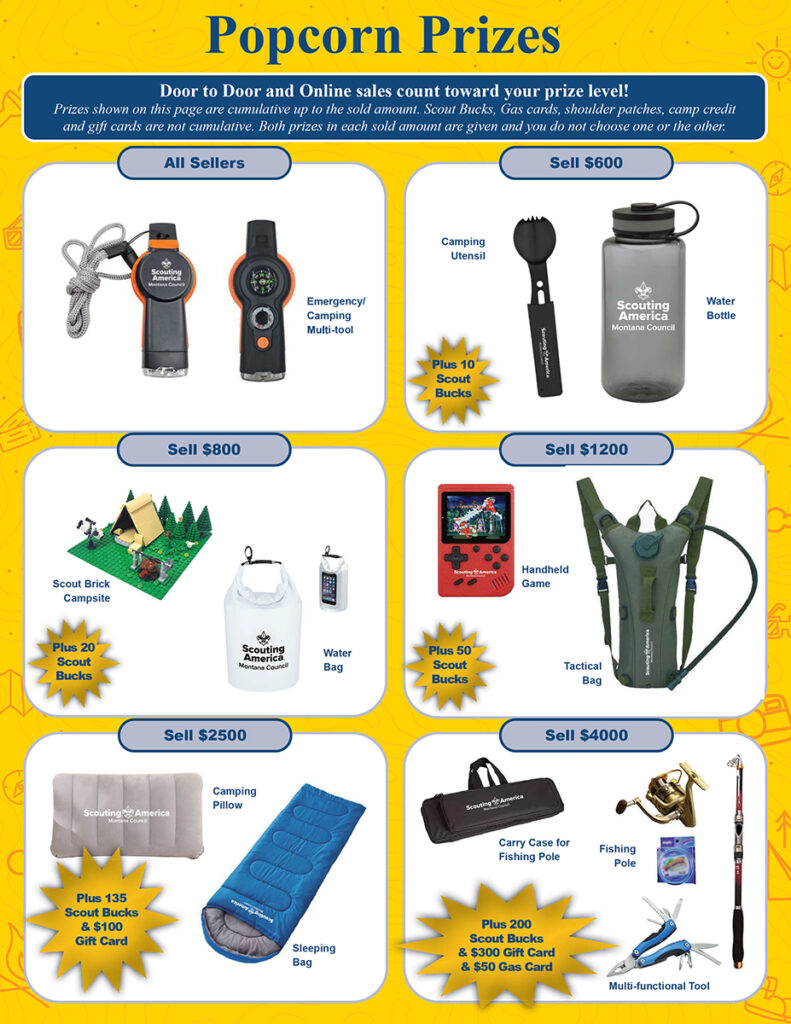
Fill it up and win